¶ Appearance
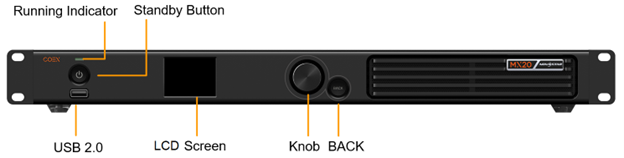
¶ Front Panel
|
Name |
Function |
|---|---|
|
Running indicator |
|
|
Standby button |
|
|
USB 2.0 |
|
|
LCD Screen |
A 2.0-inch screen to display the device status, menus, submenus and messages for parameter settings. |
|
Knob |
|
|
BACK |
Go back to the previous menu or cancel the current operation. |
¶ Rear Panel

|
Type |
Qty |
Description |
|
|---|---|---|---|
|
Inputs |
|||
|
HDMI 1.3 IN |
2 |
Resolution |
Max resolution: 1920×1200@60Hz Min resolution: 800×600@60Hz |
|
Max width/height (Forced) |
Max width: 3840 (3840×600@60Hz) Max height: 2560 (800×2560@60Hz) |
||
|
Frame rates |
23.98/24/25/29.97/30/47.95/48/50/59.94/60/71.93/72/75/ 100/119.88/120/143.86/144 Hz |
||
|
EDID management |
Support standard resolutions, up to 1920×1080@60Hz. Support custom input resolutions. |
||
|
HDCP |
HDCP 1.4 compliant, backwards compatible with HDCP 1.3. |
||
|
Interlaced signal inputs |
Not supported. |
||
|
3G-SDI IN |
1 |
Standards |
Support ST-424 (3G) and ST-292 (HD) standard video inputs. Support 3G-Level A. |
|
Resolution |
Max resolution: 1920×1080@60Hz |
||
|
Frame rates |
23.98/24/25/29.97/30/47.95/48/50/59.94/60 Hz |
||
|
Interlaced signal inputs |
Support MQ level deinterlacing. The interlaced signals will be automatically detected and converted to progressive signals. |
||
|
Outputs |
|||
|
Type |
Qty |
Description |
|
|
1–6 |
6 |
Gigabit Ethernet output ports. Support hot backup between Ethernet ports.
|
|
|
OPT 1–2 |
2 |
10G optical output ports with a transmission rate of 10 Gbps.
 The product doesn't include an optical module by default. If you need one, it's recommended to choose a compatible NovaStar product. |
|
|
HDMI 1.3 LOOP |
2 |
HDMI loop through. Up to 8 devices can be cabled in one loop. |
|
|
3G-SDI LOOP |
1 |
SDI loop through. Up to 8 devices can be cabled in one loop. |
|
|
SPDIF OUT |
1 |
Digital audio output connector allows for using the HDMI 1.3 input source as the audio output. |
|
|
Controls |
|||
|
Type |
Qty |
Description |
|
|
ETHERNET |
2 |
Gigabit Ethernet control ports. Support TCP/IP protocol and star connection. They have the same functions without priority and order, and can be connected to VMP software and central control devices. No switch or router is needed to deploy multiple devices on the same LAN via device cascading as the network switching function is already built in. Up to 20 MX20 can be cascaded. |
|
|
GENLOCK |
1 |
A pair of Genlock signal connectors. Support Bi-Level, Tri-Level, and Blackburst.
The Genlock input signal supports a frame rate range from 23.98 Hz to 60 Hz. For standard Genlock signal generators, up to 20 MX20 can be cascaded. |
|
|
AUX |
1 |
An auxiliary connector for connecting to central control devices (RS232). |
|
|
Power |
|||
|
100-240V~, 50/60Hz |
1 |
An AC power input connector and switch. |
|
¶ Dimensions
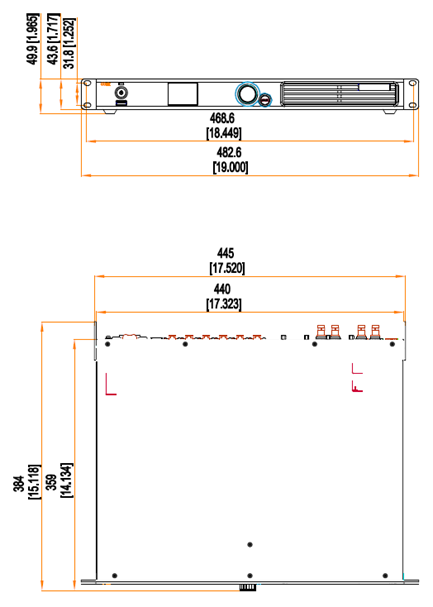
Tolerance: ±0.3 [±0.012] Unit: mm [inch]
¶ Product Specifications
|
Electrical Specifications |
Power input |
100-240V~, 50/60Hz |
|
Maximum power consumption |
50 W |
|
|
Operating Environment |
Temperature |
–20ºC to +45ºC |
|
Humidity |
0% RH to 80% RH, non-condensing |
|
|
Storage Environment |
Temperature |
–30ºC to +80ºC |
|
Humidity |
0% RH to 95% RH, non-condensing |
|
|
Physical Specifications |
Dimensions |
482.6 mm × 49.9 mm × 384.0 mm |
|
Net weight |
4.5 kg |
|
|
Gross weight |
8.1 kg Note: It is the total weight of the product, accessories, and packing materials packed according to the packing specifications. |
|
|
Packing Information |
Packing box |
590.0 mm × 520.0 mm × 180.0 mm, kraft paper box |
|
Accessory box |
408.0 mm × 294.0 mm × 51.0 mm, white cardboard box |
|
|
Accessories |
|
|
|
IP Rating |
IP20 (Please prevent the product from water intrusion and do not wet or wash the product). |
|
|
Noise Level (typical at 25°C/77°F) |
36.2 dB (A) |
|
The amount of power consumption may vary depending on various factors such as product settings, usage, and environment.
¶ Video Source Specifications
|
Input |
Resolution |
Color Space |
Sampling |
Bit Depth |
Integer Frame Rate (Hz) |
|
|---|---|---|---|---|---|---|
|
HDMI 1.3 |
2K1K |
2560×1440 |
RGB / YCbCr |
4:4:4 |
10bit |
24/25/30 |
|
8bit |
||||||
|
YCbCr |
4:2:2 |
8/10bit |
||||
|
1920×1080 |
RGB / YCbCr |
4:4:4 |
10bit |
24/25/30/48/50 |
||
|
8bit |
24/25/30/48/50/60 |
|||||
|
YCbCr |
4:2:2 |
8/10bit |
||||
|
3G-SDI |
2K1K |
2048×1080 |
YCbCr |
4:2:2 |
10bit |
24/25/30/48/50/60 |
|
1920×1080 |
||||||
Note:
The table above only displays a selection of common resolutions and integer frame rates. Decimal frame rates are also supported, allowing for automatic frame rate adaptation from the highest frame rate of each resolution down to 23.98/29.97/47.95/59.94/71.93/119.88/143.86 Hz.
¶ Ethernet Port Load Capacity
¶ When Working with A10s Pro\A8s Pro and Their Derivative Receiving Cards
When working with the A10s Pro\A8s Pro and their derivative receiving cards, the formula of calculating the load capacity per Ethernet port and the detailed parameters are as follows.
- 8bit: Load capacity × 24 × Frame rate < 1000 × 1000 × 1000 × 0.95
- 10bit: Load capacity × 32 × Frame rate < 1000 × 1000 × 1000 × 0.95
| Max Load Capacity per Ethernet Port (Pixels) | ||
|---|---|---|
| Frame Rate / Bit Depth | 8bit | 10bit |
| 24 Hz | 1,649,305.556 | 1,236,979 |
| 25 Hz | 1,583,333 | 1,187,500 |
| 30 Hz | 1,319,444 | 989,583 |
| 50 Hz | 791,667 | 593,750 |
| 60 Hz | 659,722 | 494,792 |
| 120 Hz | 329,861 | 247,396 |
| 144 Hz | 274,884 | 206,163 |
¶ When Working with Other Armor Series Receiving Cards
The formula of calculating the load capacity per Ethernet port and the detailed parameters are as follows.
- 8bit: Load capacity × 24 × Frame rate < 1000 × 1000 × 1000 × 0.95
- 10bit: Load capacity × 48 ×Frame rate < 1000 × 1000 × 1000 × 0.95
| Max Load Capacity per Ethernet Port (Pixels) | ||
|---|---|---|
| Frame Rate / Bit Depth | 8bit | 10bit |
| 24 Hz | 1,649,305.556 | 824,653 |
| 25 Hz | 1,583,333 | 791,667 |
| 30 Hz | 1,319,444 | 659,722 |
| 50 Hz | 791,667 | 395,833 |
| 60 Hz | 659,722 | 329,861 |
| 120 Hz | 329,861 | 164,931 |
| 144 Hz | 274,884 | 137,442 |
Note
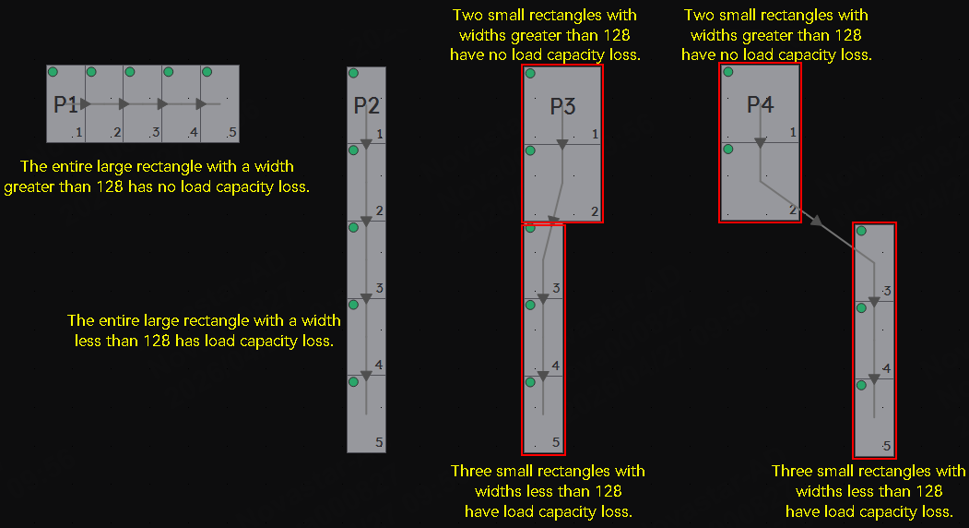
- To achieve the maximum load capacity, the width of each rectangular load area within a single Ethernet port must be at least 128 pixels. If the width of a rectangular load area within the Ethernet port is less than 128, the loss in capacity is calculated as (128 - width of the rectangular load area) × height of the rectangular load area. The total load capacity loss for the Ethernet port is the sum of the losses for all rectangular load areas within the port.
- When using the Ethernet port, pair it with a CAT5E cable for a maximum length of 100 meters.
¶ Hardware Shorts
¶ Download Links
- COEX Products File Downloads → COEX Page(The loading may take a few minutes)
We consistently enhance and refine the content of our Wiki articles.
If you find any mistakes or errors, please contact us.
Your continuous feedback and support will help us further improve our products and content.